Apps · 06 / 06
Delivery app
Driver app and live dispatch map for delivery teams.
A driver app for routes, order details, proof of delivery and cash collection. A live dispatch map helps the office assign orders and spot late stops early.
- Made for
- Delivery and field teams that hand over parcels and collect cash.
- Used by
- Drivers on the road, dispatchers in the office and the cashier at the hub.
- Runs on
- Android and iPhone for drivers, the web for the dispatch board.
The challenge
What needed solving
Many delivery and field teams still run the day on printed lists, phone calls and chat groups.
The office can't see where drivers are, so when a customer asks where their order is, the answer is a guess. Proof of delivery is a photo lost in a chat, and cash collected on the road is counted by hand at the end of the day. When an order fails or a driver falls behind, the office often finds out too late to fix it.
Features
07 partsWhat we built
Seven parts for the road and the office, from the first stop to the cash handover.
Today's route on one screen
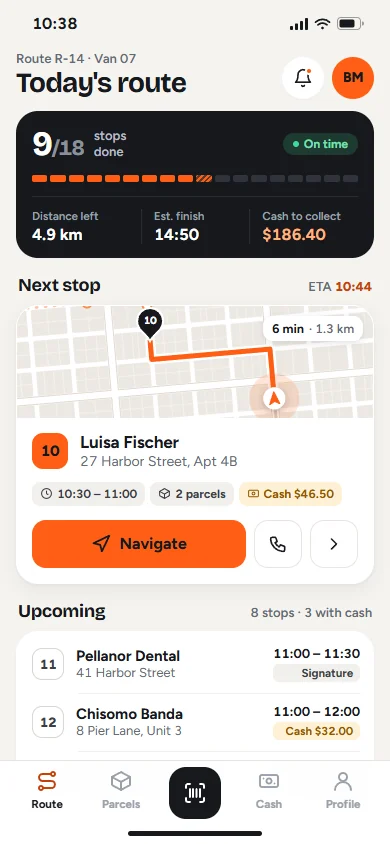
Drivers see their stops in order, with time windows, parcels and cash to collect. Progress and the estimated finish time update after every stop.
Navigation handoff
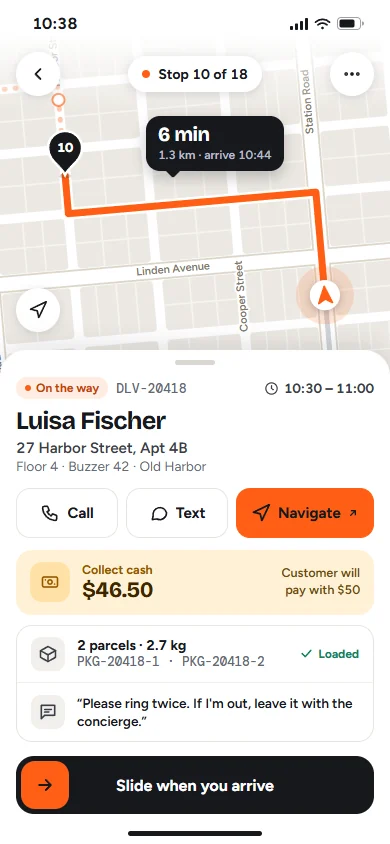
The app shows the route and arrival time to the next stop. One tap opens the address in the driver's usual maps app for turn-by-turn directions.
Proof of delivery
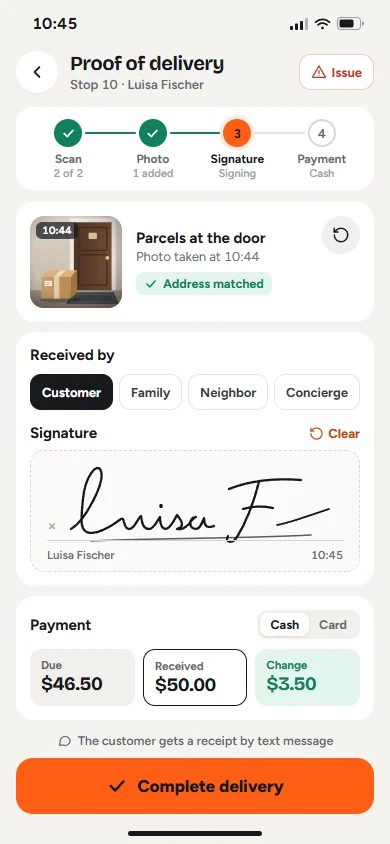
Parcel scan, photo at the door, who received it and a signature. Each step saves the time and location, and the customer gets a receipt by text message.
Cash collection and handover
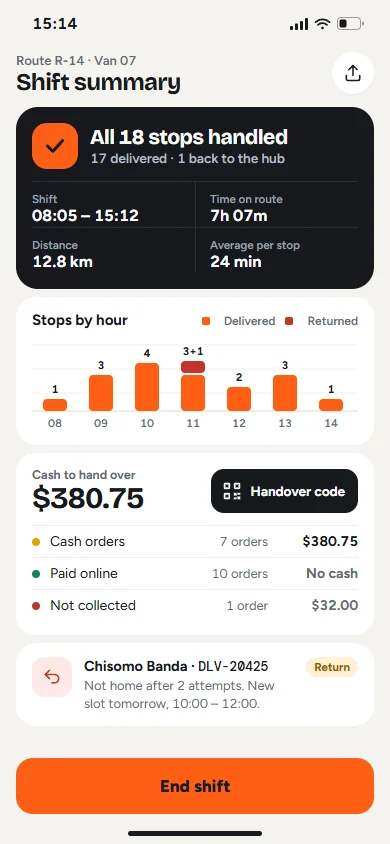
Drivers record cash received and change given. At the end of the shift, the app adds up the cash to hand over and shows a code the hub cashier scans.
Live dispatch map
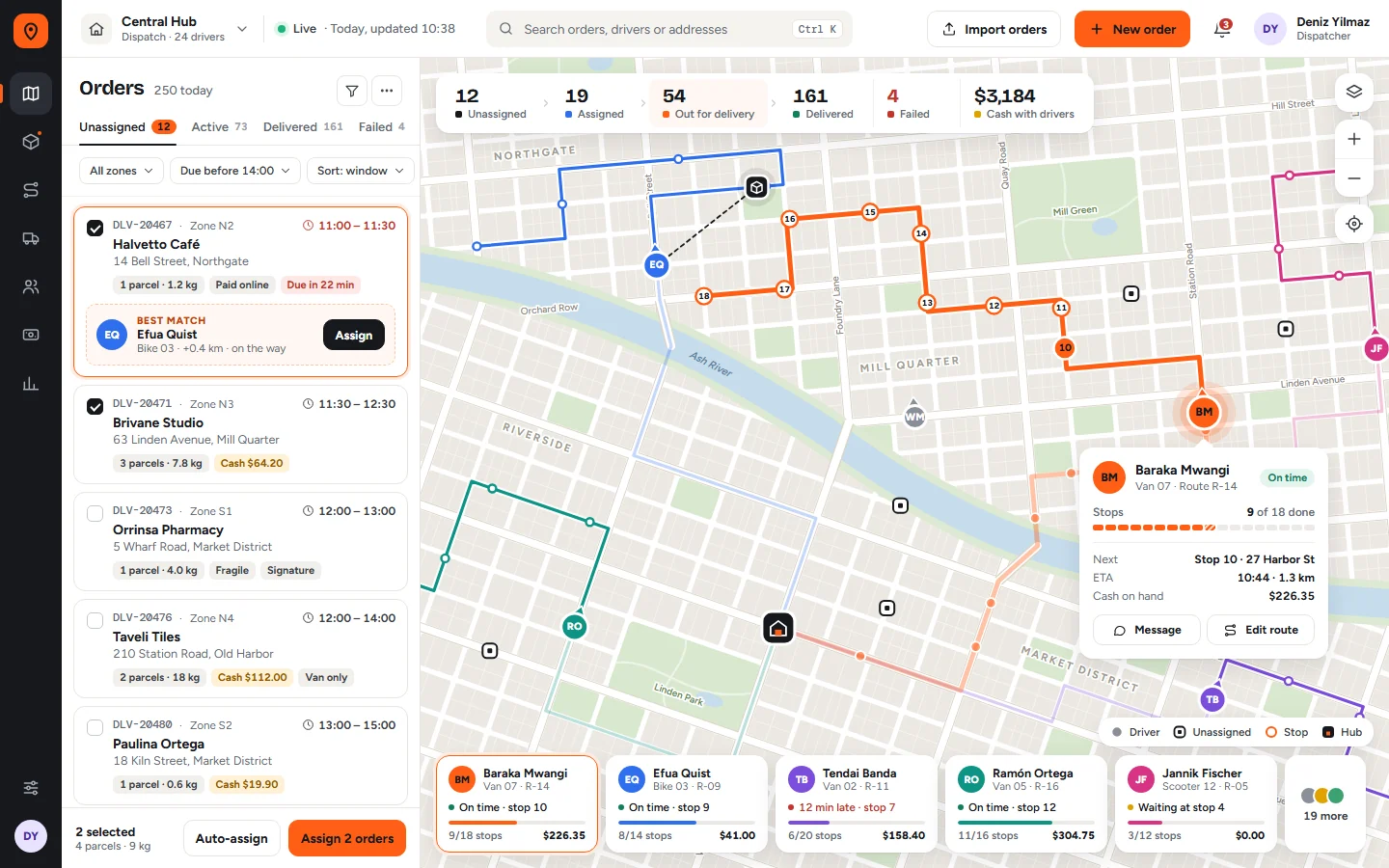
The dispatcher sees every driver, route and open order on one map, with clear statuses from unassigned to delivered or failed.
Order assignment
Assign orders one by one or in bulk. For each order, the system suggests a driver who is nearby or already on the way, with the extra distance shown.
Failed deliveries and returns
Drivers report a problem in two taps. The order gets a new time slot, the customer gets a message, and the parcel is listed for return to the hub.
How it works
04 stepsFrom first click to daily use
- 01
Orders come in
Orders arrive from your online store, your business system or a spreadsheet import, and appear on the dispatch board as unassigned.
- 02
Dispatch assigns the work
The dispatcher assigns orders to drivers on the map or accepts the suggested driver. Each route is ordered by time window and location.
- 03
Drivers deliver
Drivers follow their route in the app, navigate with their usual maps app, and complete each stop with scan, photo, signature and payment.
- 04
Everyone stays up to date
The map, customer messages and cash totals update as each stop is completed. At the end of the day, drivers close the shift and hand over cash with a code.
Built with
The tools behind it
- Flutter (Android and iPhone)
- Laravel / PHP
- React
- PostgreSQL with PostGIS
- Redis
- WebSockets
- Google Maps Platform or Mapbox
- Firebase Cloud Messaging
- WhatsApp Business API and SMS
- AWS or DigitalOcean
Next project
01 / 06Sales CRM
Contact
Want something like this?
Tell us how your business works. We'll suggest what fits, even if that's a ready-made tool. No tech words needed.
What do you need?
Chat on WhatsApp+90 552 257 90 00 // Emailinfo@qcoders.com
Apps
Delivery app
Driver app and live dispatch map for delivery teams.
A driver app for routes, order details, proof of delivery and cash collection. A live dispatch map helps the office assign orders and spot late stops early.
- Made for
- Delivery and field teams that hand over parcels and collect cash.
- Used by
- Drivers on the road, dispatchers in the office and the cashier at the hub.
- Runs on
- Android and iPhone for drivers, the web for the dispatch board.
The challenge
What needed solving
Many delivery and field teams still run the day on printed lists, phone calls and chat groups.
The office can't see where drivers are, so when a customer asks where their order is, the answer is a guess. Proof of delivery is a photo lost in a chat, and cash collected on the road is counted by hand at the end of the day. When an order fails or a driver falls behind, the office often finds out too late to fix it.
Features
What we built
Seven parts for the road and the office, from the first stop to the cash handover.
-
Today's route on one screen
Drivers see their stops in order, with time windows, parcels and cash to collect. Progress and the estimated finish time update after every stop.
-
Navigation handoff
The app shows the route and arrival time to the next stop. One tap opens the address in the driver's usual maps app for turn-by-turn directions.
-
Proof of delivery
Parcel scan, photo at the door, who received it and a signature. Each step saves the time and location, and the customer gets a receipt by text message.
-
Cash collection and handover
Drivers record cash received and change given. At the end of the shift, the app adds up the cash to hand over and shows a code the hub cashier scans.
-
Live dispatch map
The dispatcher sees every driver, route and open order on one map, with clear statuses from unassigned to delivered or failed.
-
Order assignment
Assign orders one by one or in bulk. For each order, the system suggests a driver who is nearby or already on the way, with the extra distance shown.
-
Failed deliveries and returns
Drivers report a problem in two taps. The order gets a new time slot, the customer gets a message, and the parcel is listed for return to the hub.
-
Built with
- Flutter (Android and iPhone)
- Laravel / PHP
- React
- PostgreSQL with PostGIS
- Redis
- WebSockets
- Google Maps Platform or Mapbox
- Firebase Cloud Messaging
- WhatsApp Business API and SMS
- AWS or DigitalOcean
How it works
From first click to daily use
-
Dispatch board: every driver and route on a live map, unassigned orders with a suggested driver, and order statuses at the top. Orders come in
Orders arrive from your online store, your business system or a spreadsheet import, and appear on the dispatch board as unassigned.
Dispatch board: every driver and route on a live map, unassigned orders with a suggested driver, and order statuses at the top.
-
Driver app: today's route with progress, the next stop and the cash still to collect. Dispatch assigns the work
The dispatcher assigns orders to drivers on the map or accepts the suggested driver. Each route is ordered by time window and location.
Driver app: today's route with progress, the next stop and the cash still to collect.
-
Proof of delivery: parcel scan, photo at the door, recipient and signature, then cash with change. Drivers deliver
Drivers follow their route in the app, navigate with their usual maps app, and complete each stop with scan, photo, signature and payment.
Proof of delivery: parcel scan, photo at the door, recipient and signature, then cash with change.
-
End of shift: stops handled, cash to hand over with a handover code, and parcels to return to the hub. Everyone stays up to date
The map, customer messages and cash totals update as each stop is completed. At the end of the day, drivers close the shift and hand over cash with a code.
End of shift: stops handled, cash to hand over with a handover code, and parcels to return to the hub.
Contact
Want something like this?
Pick what you need and we'll write the first message for you. No tech words needed.