Stores · 04 / 06
Online store
A modern fashion store, with one admin to ship orders.
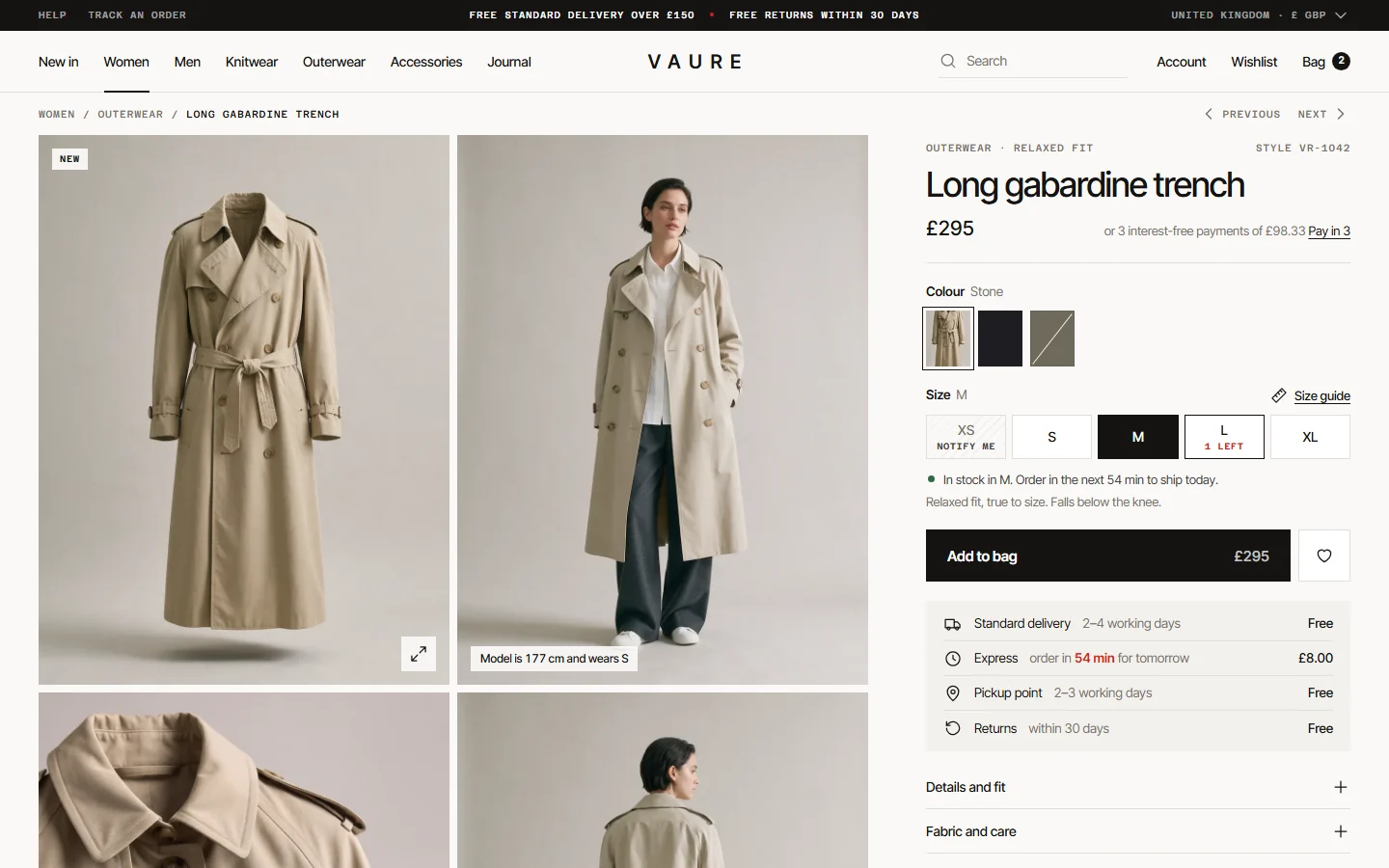
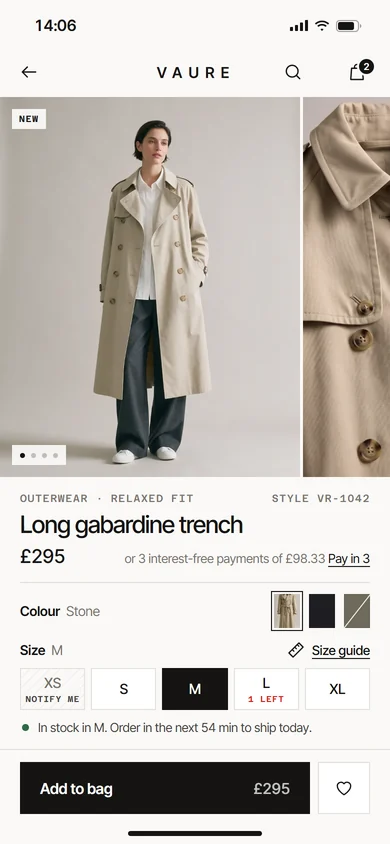
An online store for fashion brands, with large photos and a short checkout. Behind it, the team packs orders, prints labels and handles returns in one admin.
- Made for
- Fashion brands that sell online.
- Used by
- Shoppers on their phones, and the team that packs and ships the orders.
- Runs on
- The web, on phones and computers, with one admin for the team.
The challenge
What needed solving
Many clothing brands sell through social media messages and a basic shop template.
Shoppers can't filter by their size, see what is in stock or pay the way they prefer, so many of them leave at checkout. Behind the scenes, the team copies addresses into courier websites by hand and answers the same 'where is my order?' message all day. Stock goes wrong when the same item sells in two places at once.
Features
08 partsWhat we built
Eight parts for the shopper and the team, from the first photo to the tracking number.
A storefront led by photos
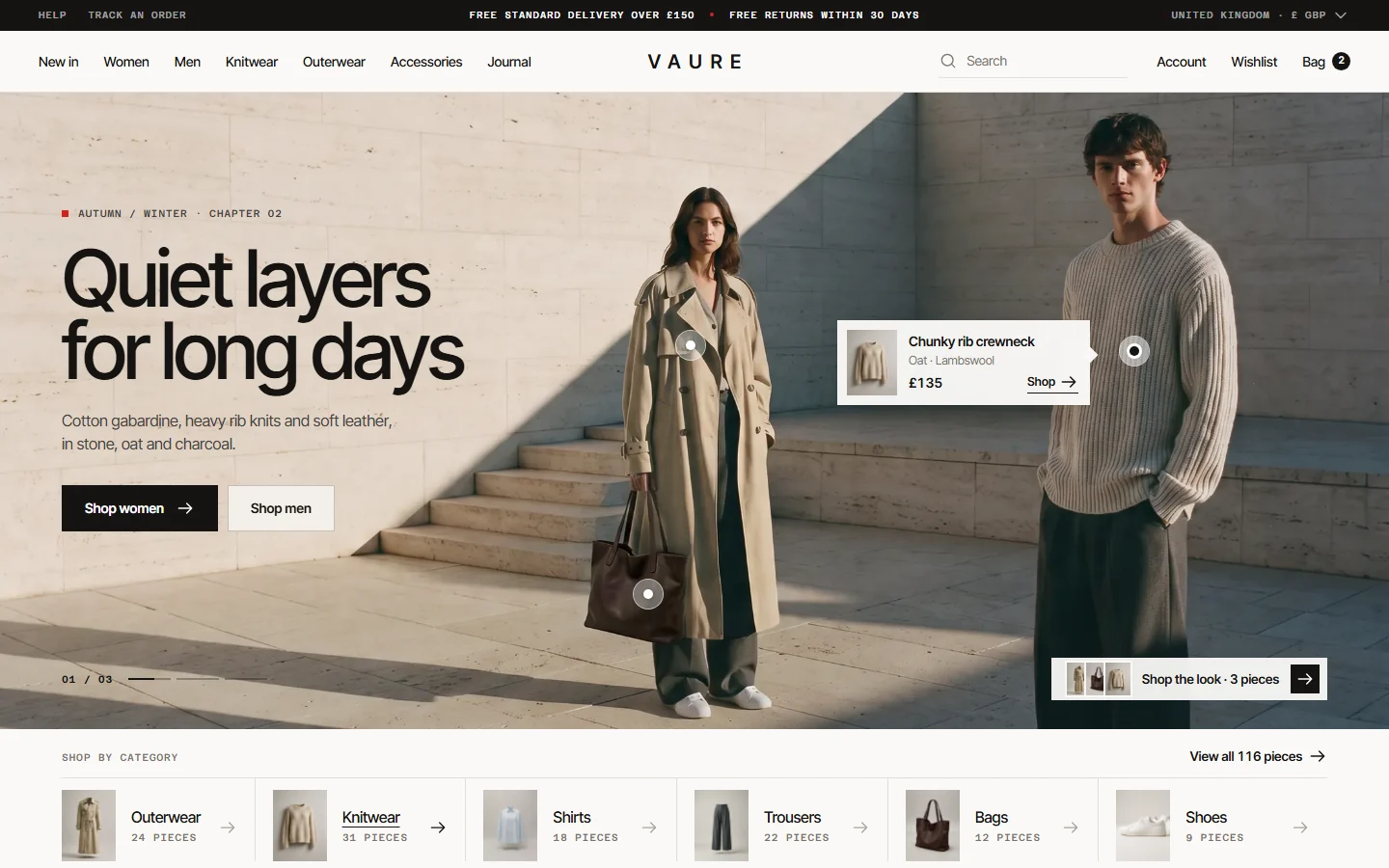
Large product photos, campaign images you can shop from and clear categories. Shoppers tap a piece in a campaign photo to see its price and open it.
Filters that match real stock
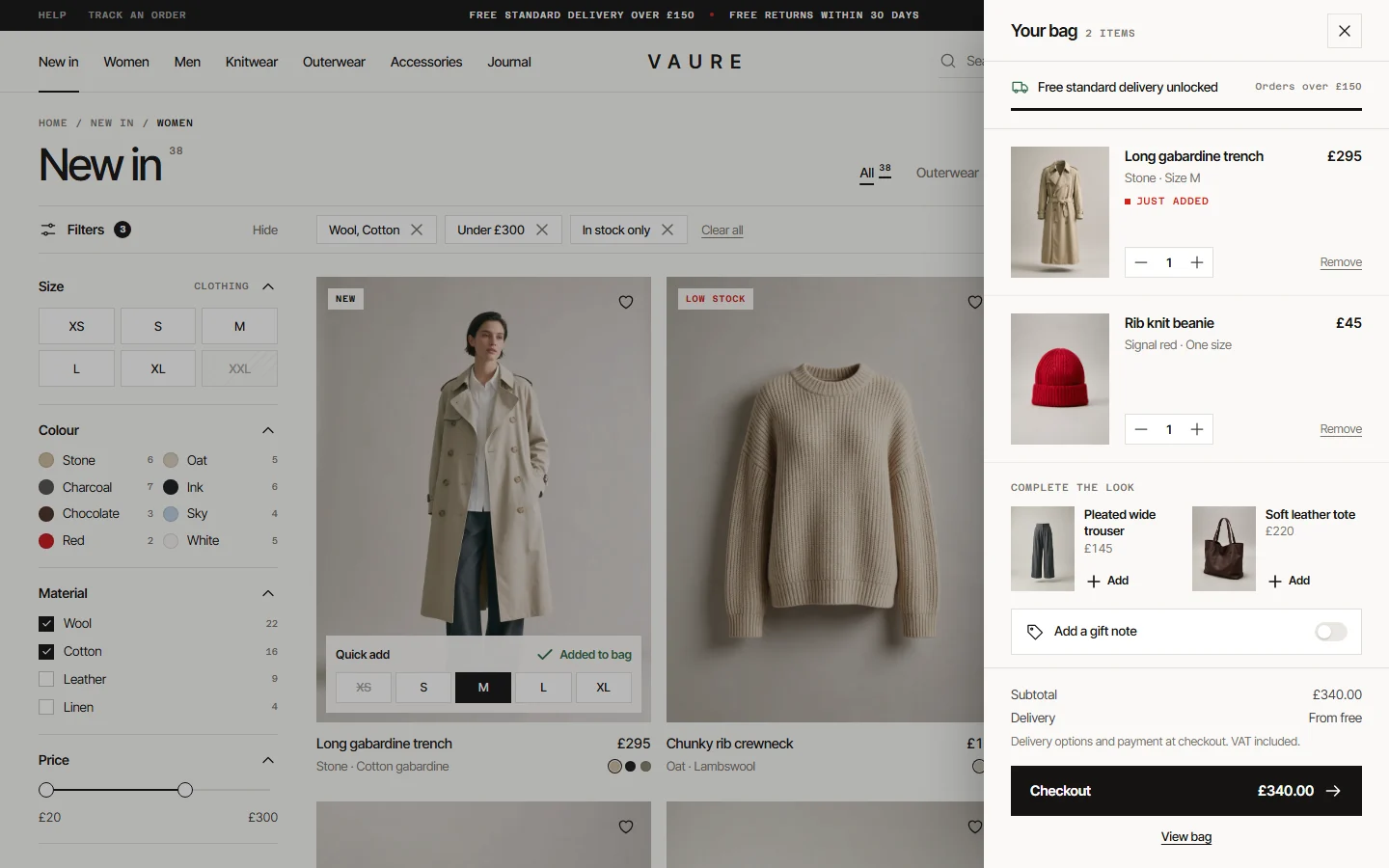
Shoppers filter by size, colour, material and price. With in-stock only turned on, sold-out items are hidden and sold-out sizes are greyed out.
Quick add and a bag drawer
Shoppers pick a size straight from the collection page. The bag opens at the side, shows how close they are to free delivery and suggests pieces that go with it.
Product pages with variants
Each colour and size is a real variant with its own stock and photos. Sold-out sizes offer a back-in-stock alert, and low stock shows on the size itself.
A short checkout on mobile
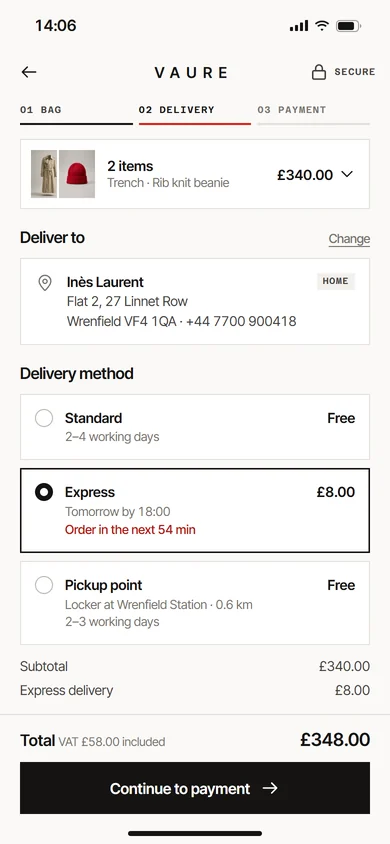
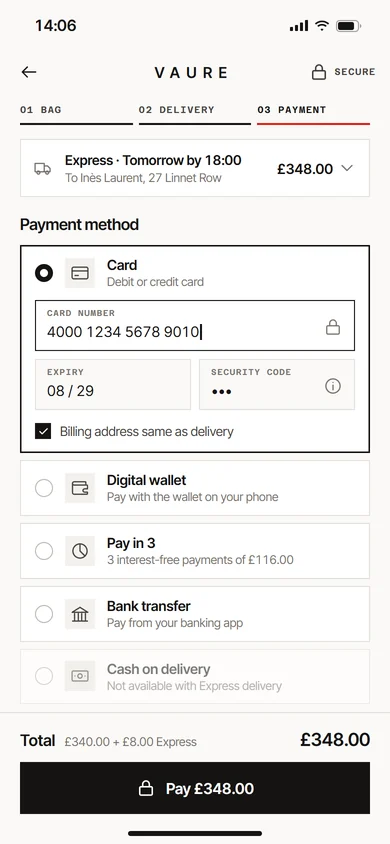
Three steps: bag, delivery and payment. Standard, express and pickup point delivery, with the delivery cost, VAT and total clear before payment.
Many ways to pay
Cards, digital wallets, pay in 3, bank transfer and cash on delivery. Each method can be turned on or off per delivery type.
Orders admin with clear statuses
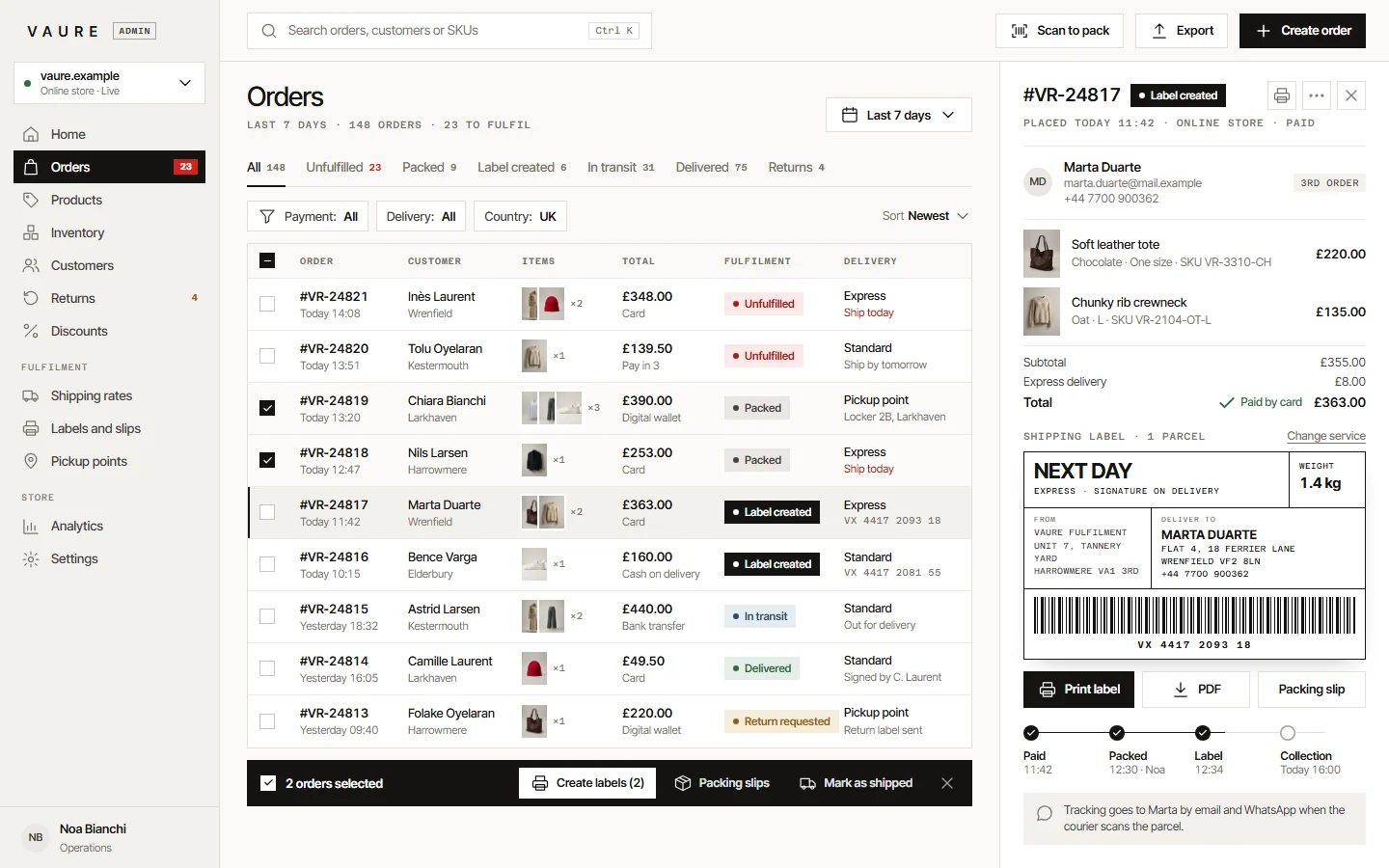
Every order moves through clear steps: unfulfilled, packed, label created, in transit and delivered. Returns are handled from the same screen.
Shipping labels and tracking
Create courier labels for one order or many at once. The tracking number is saved on the order and sent to the customer by email and WhatsApp.
How it works
04 stepsFrom first click to daily use
- 01
Shop
The shopper browses, filters and adds pieces to the bag. Filters read live stock, so results show only what can ship.
- 02
Pay
The shopper picks a delivery option and a payment method. The payment provider confirms the payment, then the order is created and the stock is reserved.
- 03
Pack
The order appears in the admin as unfulfilled. The team prints the packing slip, packs the items and marks the order as packed.
- 04
Ship and update
One click creates the courier label and tracking number. The customer gets updates by email and WhatsApp until the parcel arrives.
Built with
The tools behind it
- Next.js
- React
- Laravel (PHP)
- PostgreSQL
- Redis
- Meilisearch
- Stripe or a local payment gateway
- Courier and shipping APIs
- WhatsApp Business API
- AWS / DigitalOcean
Next project
05 / 06AI document assistant
Contact
Want something like this?
Tell us how your business works. We'll suggest what fits, even if that's a ready-made tool. No tech words needed.
What do you need?
Chat on WhatsApp+90 552 257 90 00 // Emailinfo@qcoders.com
Stores
Online store
A modern fashion store, with one admin to ship orders.
An online store for fashion brands, with large photos and a short checkout. Behind it, the team packs orders, prints labels and handles returns in one admin.
- Made for
- Fashion brands that sell online.
- Used by
- Shoppers on their phones, and the team that packs and ships the orders.
- Runs on
- The web, on phones and computers, with one admin for the team.
The challenge
What needed solving
Many clothing brands sell through social media messages and a basic shop template.
Shoppers can't filter by their size, see what is in stock or pay the way they prefer, so many of them leave at checkout. Behind the scenes, the team copies addresses into courier websites by hand and answers the same 'where is my order?' message all day. Stock goes wrong when the same item sells in two places at once.

Features
What we built
Eight parts for the shopper and the team, from the first photo to the tracking number.
-
A storefront led by photos
Large product photos, campaign images you can shop from and clear categories. Shoppers tap a piece in a campaign photo to see its price and open it.
-
Filters that match real stock
Shoppers filter by size, colour, material and price. With in-stock only turned on, sold-out items are hidden and sold-out sizes are greyed out.
-
Quick add and a bag drawer
Shoppers pick a size straight from the collection page. The bag opens at the side, shows how close they are to free delivery and suggests pieces that go with it.
-
Product pages with variants
Each colour and size is a real variant with its own stock and photos. Sold-out sizes offer a back-in-stock alert, and low stock shows on the size itself.
-
A short checkout on mobile
Three steps: bag, delivery and payment. Standard, express and pickup point delivery, with the delivery cost, VAT and total clear before payment.
-
Many ways to pay
Cards, digital wallets, pay in 3, bank transfer and cash on delivery. Each method can be turned on or off per delivery type.
-
Orders admin with clear statuses
Every order moves through clear steps: unfulfilled, packed, label created, in transit and delivered. Returns are handled from the same screen.
-
Shipping labels and tracking
Create courier labels for one order or many at once. The tracking number is saved on the order and sent to the customer by email and WhatsApp.
-
Built with
- Next.js
- React
- Laravel (PHP)
- PostgreSQL
- Redis
- Meilisearch
- Stripe or a local payment gateway
- Courier and shipping APIs
- WhatsApp Business API
- AWS / DigitalOcean
How it works
From first click to daily use
-
Collection page with filters for size, colour, material and price. Quick add opens the bag at the side. Shop
The shopper browses, filters and adds pieces to the bag. Filters read live stock, so results show only what can ship.
Collection page with filters for size, colour, material and price. Quick add opens the bag at the side.
-
Mobile checkout: card, digital wallet, pay in 3, bank transfer and cash on delivery. Pay
The shopper picks a delivery option and a payment method. The payment provider confirms the payment, then the order is created and the stock is reserved.
Mobile checkout: card, digital wallet, pay in 3, bank transfer and cash on delivery.
-
Orders admin with fulfilment statuses, bulk label printing and a shipping label preview for each order. Pack
The order appears in the admin as unfulfilled. The team prints the packing slip, packs the items and marks the order as packed.
Orders admin with fulfilment statuses, bulk label printing and a shipping label preview for each order.
-
Orders admin with fulfilment statuses, bulk label printing and a shipping label preview for each order. Ship and update
One click creates the courier label and tracking number. The customer gets updates by email and WhatsApp until the parcel arrives.
Orders admin with fulfilment statuses, bulk label printing and a shipping label preview for each order.

Contact
Want something like this?
Pick what you need and we'll write the first message for you. No tech words needed.