Systems · 03 / 06
Booking system
Online booking, staff calendar and reminders in one place.
A booking system for clinics, salons and studios that takes bookings online, collects a deposit and sends reminders automatically. Staff see the whole week on one calendar, with each client's history, payments and no-shows next to every booking.
- Made for
- Clinics, salons and studios that work by appointment.
- Used by
- Clients who book online, the front desk and the owner.
- Runs on
- The web for the booking page and the calendar, WhatsApp and SMS for reminders.
The challenge
What needed solving
Many service businesses still take bookings by phone, WhatsApp and a paper diary.
The front desk spends hours confirming times, and when a client does not come, the empty slot is lost. Staff hours, client notes and payments live in different places. This makes it hard to see who is coming, who has paid and who often misses visits.
Features
07 partsWhat we built
Seven parts that run the front desk, from the first booking to the waitlist.
Online booking page
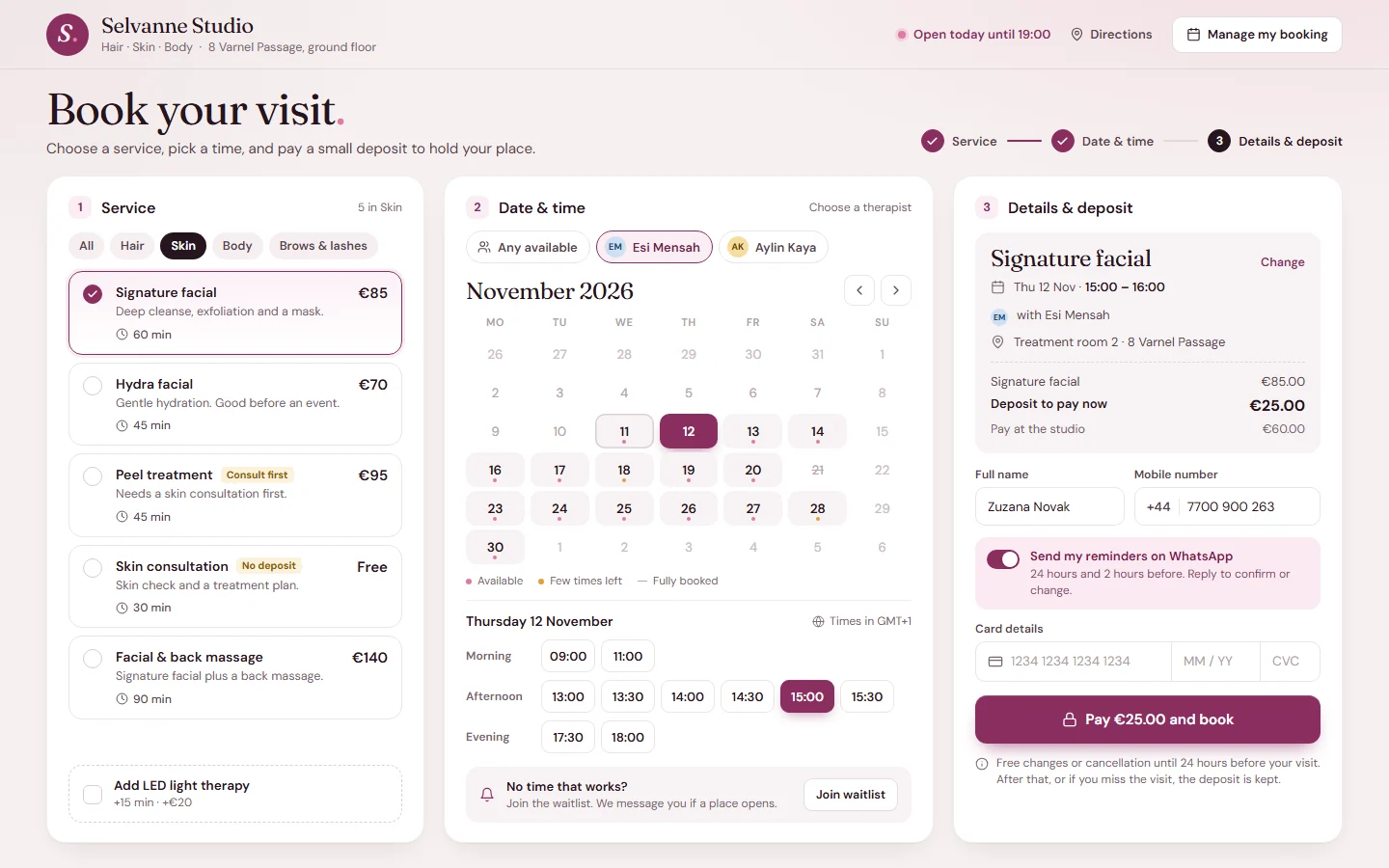
Clients pick a service, a staff member and a free time, then pay a deposit to hold it. The page shows only times that really work, based on staff hours, breaks and rooms.
Staff week calendar
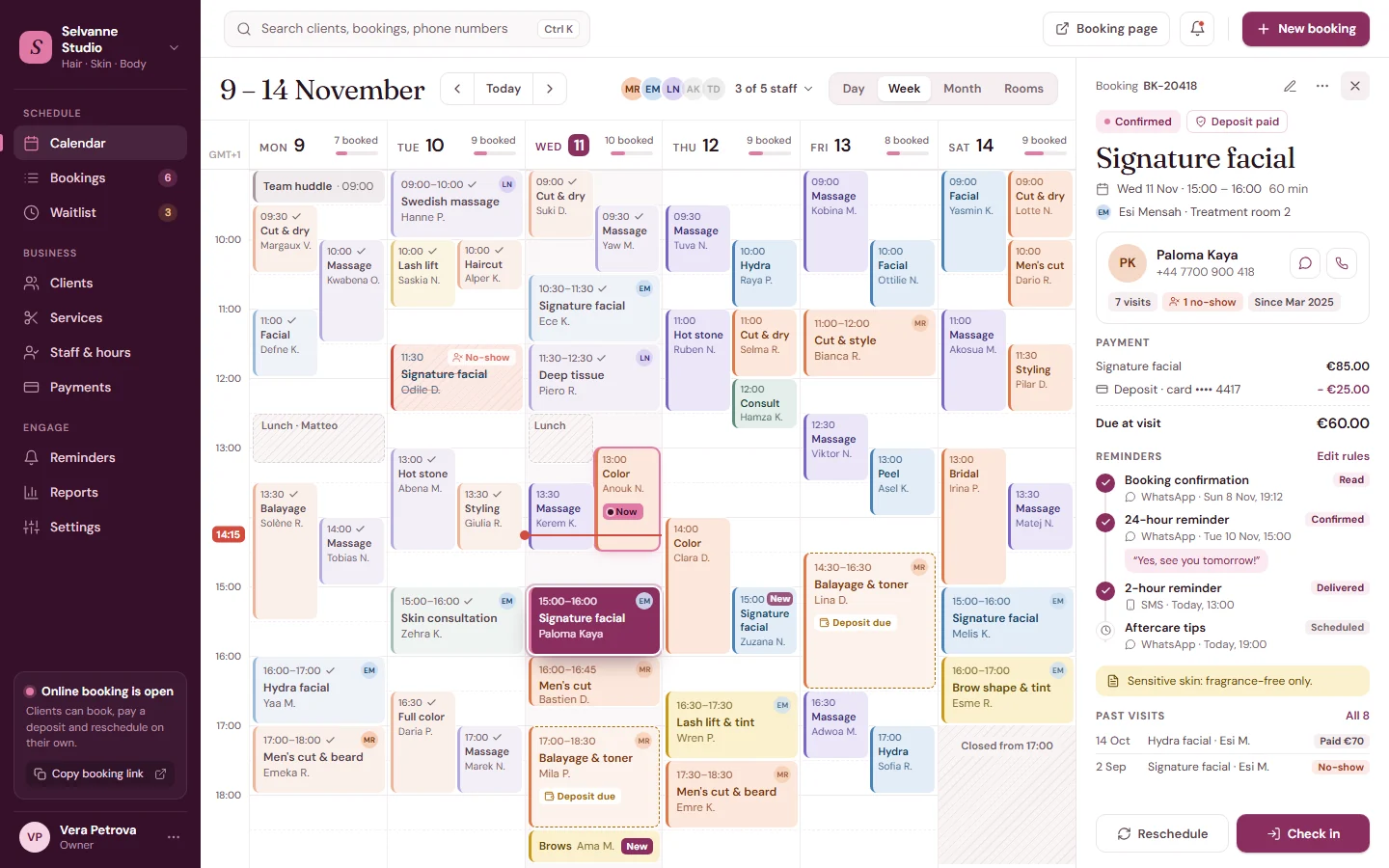
The whole team on one screen: bookings colored by service, breaks, closed hours and a live time line. The front desk checks clients in, moves bookings and sees who still owes a deposit.
WhatsApp and SMS reminders
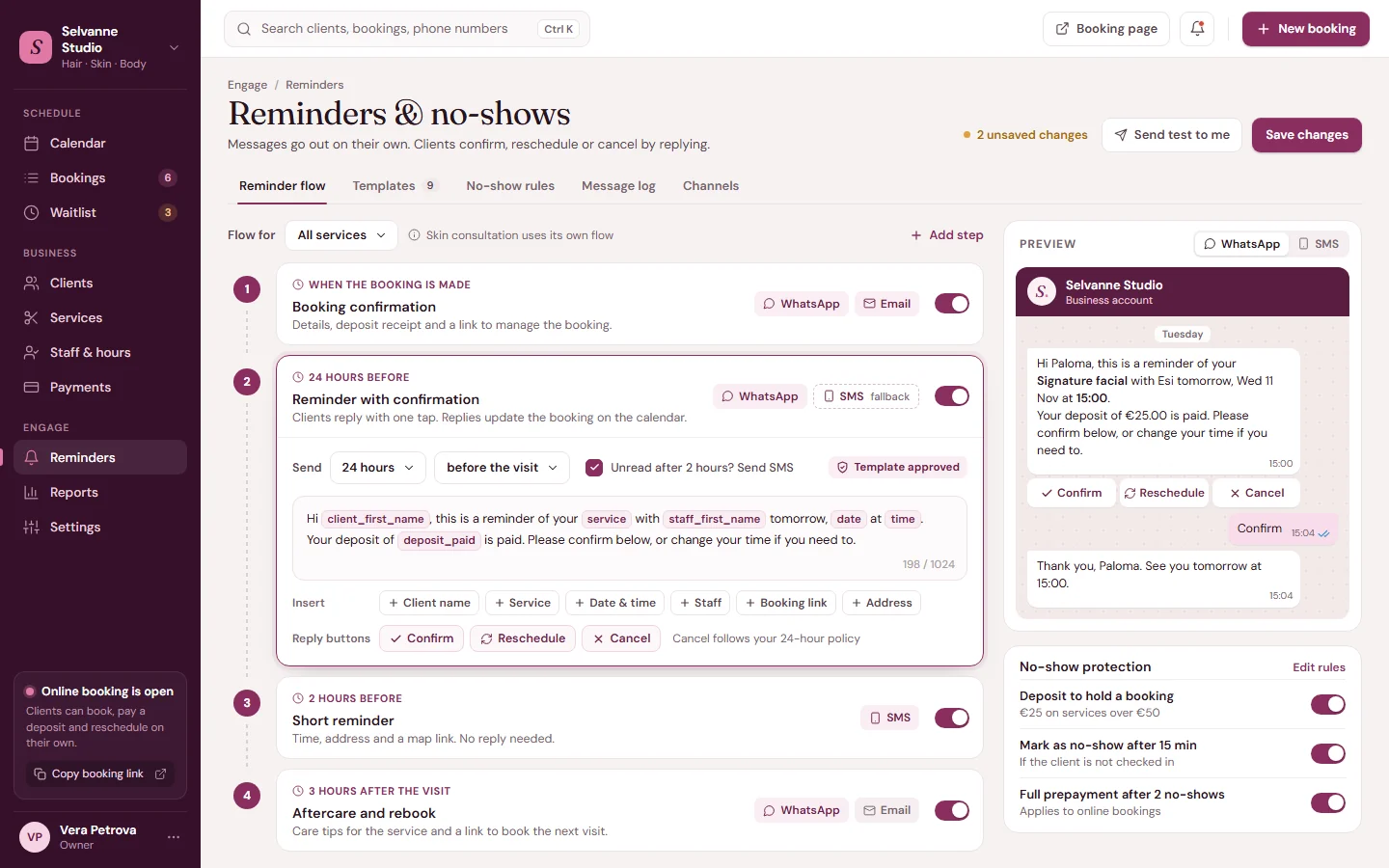
Confirmation, 24-hour and 2-hour messages go out on their own, followed by aftercare tips after the visit. Clients confirm, reschedule or cancel with one tap, and the reply updates the booking. If a WhatsApp message is not read, an SMS goes out instead.
Deposits and online payment
Clients pay a deposit by card when they book and pay the rest at the visit. Your cancellation rules decide when a deposit is kept.
Client records
Each client's visits, notes, payments and messages in one place, so any staff member knows the full story before the visit starts.
No-show tracking
A visit is marked as a no-show if the client is not checked in on time. After repeated no-shows, the system can ask for full payment on the next online booking.
Waitlist
When a day is full, clients join a waitlist and get a message as soon as a place opens.
How it works
04 stepsFrom first click to daily use
- 01
Set up the business
Add services, prices, durations, staff hours, rooms and deposit rules. The booking page uses these rules to show free times.
- 02
Clients book and pay
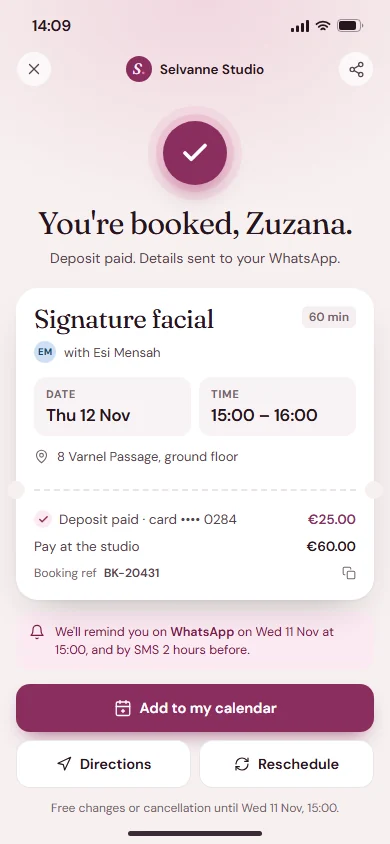
Clients book from a link on your website, social pages or WhatsApp. They pay a deposit by card and get a confirmation on WhatsApp right away.
- 03
Reminders run on their own
The system sends reminders before each visit and reads the replies. Confirmed, rescheduled and cancelled visits update the calendar automatically.
- 04
Run the day from one screen
The front desk checks clients in, takes the rest of the payment and marks no-shows. Owners see bookings, payments and no-shows by day, staff member or service.
Built with
The tools behind it
- Laravel (PHP)
- React
- Next.js
- PostgreSQL
- Redis (queues and scheduled reminders)
- WhatsApp Business API
- SMS gateway
- Stripe / Paymob
- Calendar files (ICS) for Google and Apple calendars
- AWS / DigitalOcean
Next project
04 / 06Fashion online store
Contact
Want something like this?
Tell us how your business works. We'll suggest what fits, even if that's a ready-made tool. No tech words needed.
What do you need?
Chat on WhatsApp+90 552 257 90 00 // Emailinfo@qcoders.com
Systems
Booking system
Online booking, staff calendar and reminders in one place.
A booking system for clinics, salons and studios that takes bookings online, collects a deposit and sends reminders automatically. Staff see the whole week on one calendar, with each client's history, payments and no-shows next to every booking.
- Made for
- Clinics, salons and studios that work by appointment.
- Used by
- Clients who book online, the front desk and the owner.
- Runs on
- The web for the booking page and the calendar, WhatsApp and SMS for reminders.
The challenge
What needed solving
Many service businesses still take bookings by phone, WhatsApp and a paper diary.
The front desk spends hours confirming times, and when a client does not come, the empty slot is lost. Staff hours, client notes and payments live in different places. This makes it hard to see who is coming, who has paid and who often misses visits.

Features
What we built
Seven parts that run the front desk, from the first booking to the waitlist.
-
Online booking page
Clients pick a service, a staff member and a free time, then pay a deposit to hold it. The page shows only times that really work, based on staff hours, breaks and rooms.
-
Staff week calendar
The whole team on one screen: bookings colored by service, breaks, closed hours and a live time line. The front desk checks clients in, moves bookings and sees who still owes a deposit.
-
WhatsApp and SMS reminders
Confirmation, 24-hour and 2-hour messages go out on their own, followed by aftercare tips after the visit. Clients confirm, reschedule or cancel with one tap, and the reply updates the booking. If a WhatsApp message is not read, an SMS goes out instead.
-
Deposits and online payment
Clients pay a deposit by card when they book and pay the rest at the visit. Your cancellation rules decide when a deposit is kept.
-
Client records
Each client's visits, notes, payments and messages in one place, so any staff member knows the full story before the visit starts.
-
No-show tracking
A visit is marked as a no-show if the client is not checked in on time. After repeated no-shows, the system can ask for full payment on the next online booking.
-
Waitlist
When a day is full, clients join a waitlist and get a message as soon as a place opens.
-
Built with
- Laravel (PHP)
- React
- Next.js
- PostgreSQL
- Redis (queues and scheduled reminders)
- WhatsApp Business API
- SMS gateway
- Stripe / Paymob
- Calendar files (ICS) for Google and Apple calendars
- AWS / DigitalOcean
How it works
From first click to daily use
-
Public booking page: clients choose a service, a therapist and a free time, then pay a deposit to hold it. Set up the business
Add services, prices, durations, staff hours, rooms and deposit rules. The booking page uses these rules to show free times.
Public booking page: clients choose a service, a therapist and a free time, then pay a deposit to hold it.
-
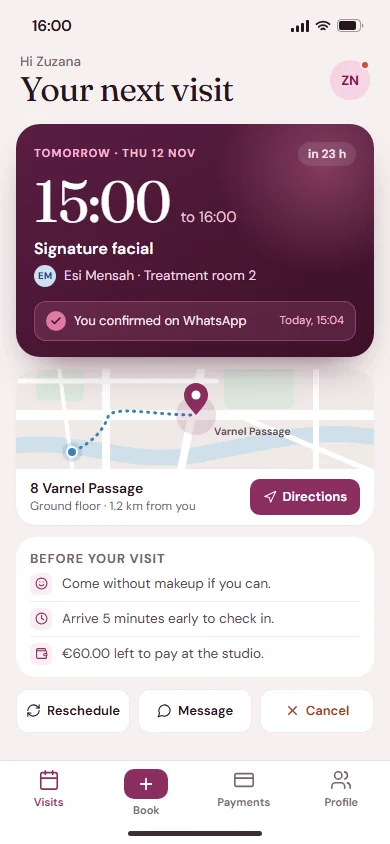
Booking confirmation on the client's phone, with the deposit receipt, reminder plan and add-to-calendar. Clients book and pay
Clients book from a link on your website, social pages or WhatsApp. They pay a deposit by card and get a confirmation on WhatsApp right away.
Booking confirmation on the client's phone, with the deposit receipt, reminder plan and add-to-calendar.
-
Reminder settings: the WhatsApp and SMS flow step by step, a message template with live preview, and no-show rules. Reminders run on their own
The system sends reminders before each visit and reads the replies. Confirmed, rescheduled and cancelled visits update the calendar automatically.
Reminder settings: the WhatsApp and SMS flow step by step, a message template with live preview, and no-show rules.
-
Staff week calendar: bookings by service, breaks, a live time line, and the booking panel with deposit, reminders and visit history. Run the day from one screen
The front desk checks clients in, takes the rest of the payment and marks no-shows. Owners see bookings, payments and no-shows by day, staff member or service.
Staff week calendar: bookings by service, breaks, a live time line, and the booking panel with deposit, reminders and visit history.

Contact
Want something like this?
Pick what you need and we'll write the first message for you. No tech words needed.