Systems · 02 / 06
Inventory and sales
Every branch's stock, sales and purchasing in one system.
A system for retail and wholesale businesses that sell from several stores and a warehouse. It brings stock, sales, transfers, purchase orders and profit reports into one place, on desktop and phone.
- Made for
- Shops and wholesalers that sell from several stores and a warehouse.
- Used by
- Cashiers, warehouse staff, buyers and managers, in one system.
- Runs on
- Desktop at the register and the office, phones on the shop floor.
The challenge
What needed solving
When a business sells from several stores and a warehouse, its stock lives in many places at once.
Counts sit in spreadsheets or separate tools, so nobody knows what is really on the shelf until someone calls the branch. A popular item runs out in one store while full boxes wait in the warehouse, and reorders are based on guesses. Sales, costs and profit are then put together by hand at the end of the month.
Features
07 partsWhat we built
Seven parts that keep stock right in every location, from the register to the purchase order.
Live stock per location
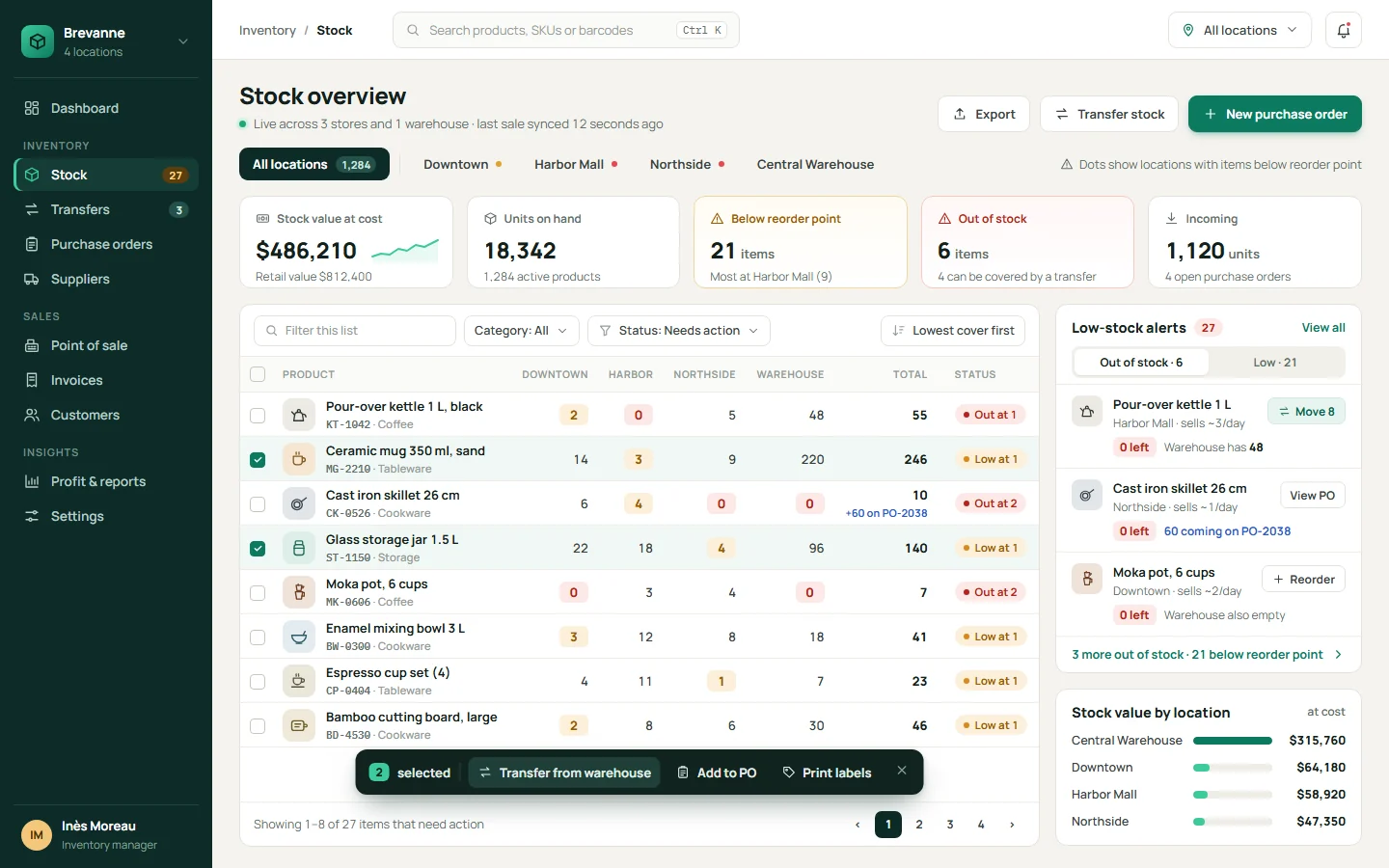
Every store and warehouse in one table, updated with each sale, transfer and delivery. Filter by location, category or status, and see stock value at cost.
Low-stock alerts with a next step
Each product has a reorder point per location. When stock drops below it, the system checks whether another location can cover it with a transfer, or whether it needs a new order.
Point of sale
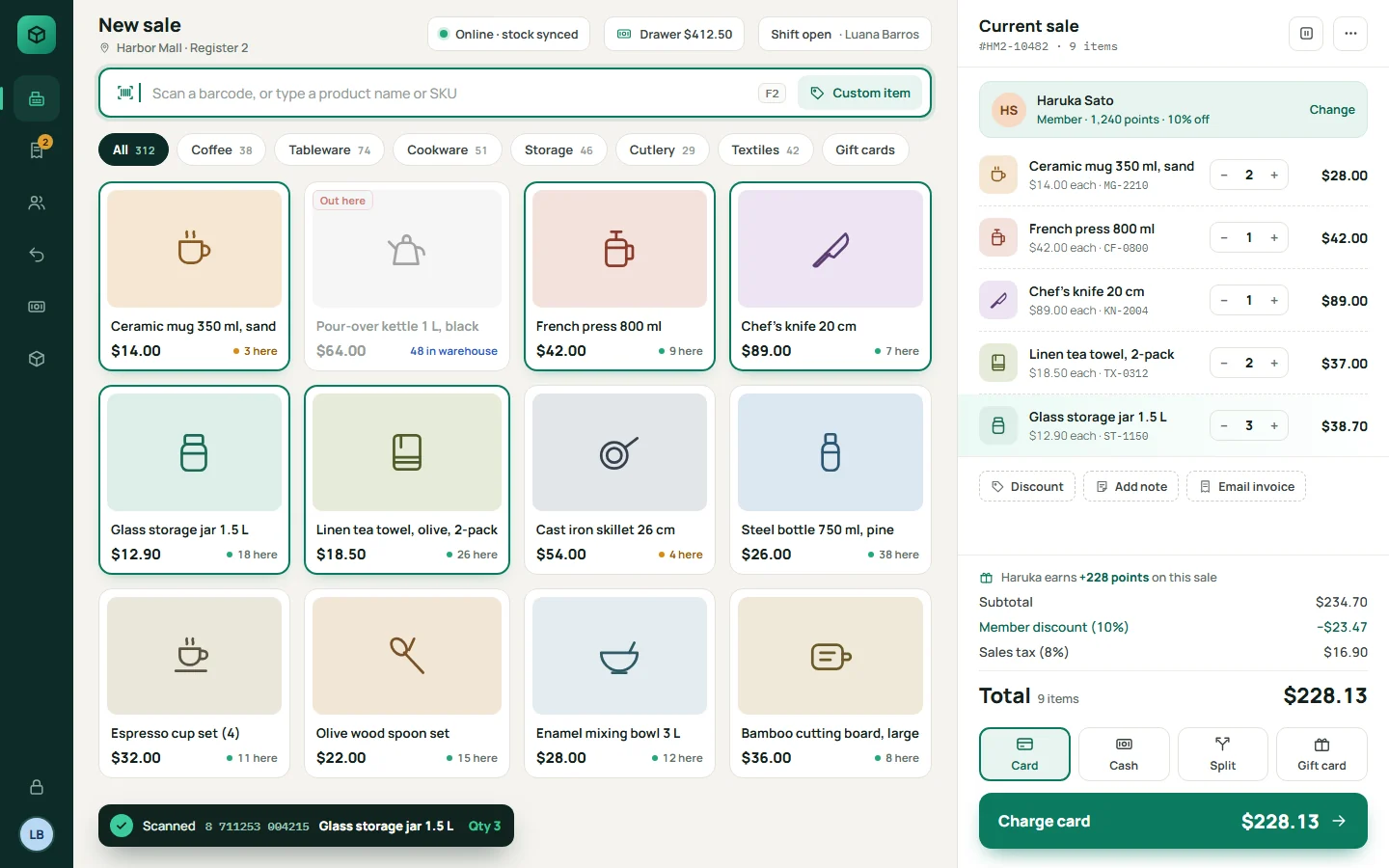
A fast checkout for each register, with barcode scanning, member discounts, tax and card, cash or split payments. Every sale lowers the stock of that store right away.
Transfers between locations
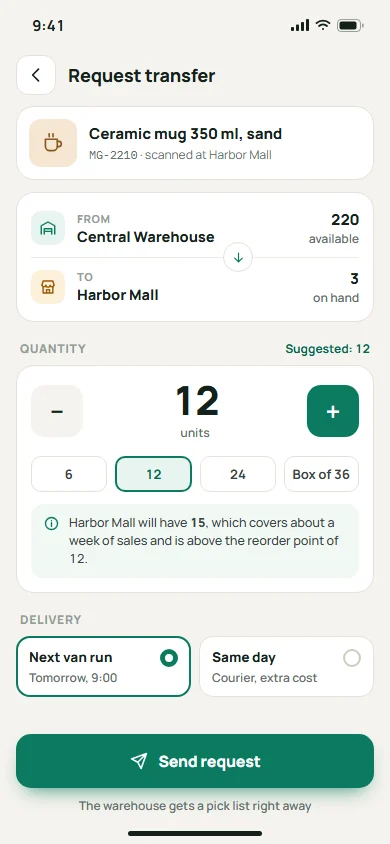
Staff request stock from the warehouse or another store. The sender gets a pick list, and both locations update when the transfer is received.
Purchase orders with approval
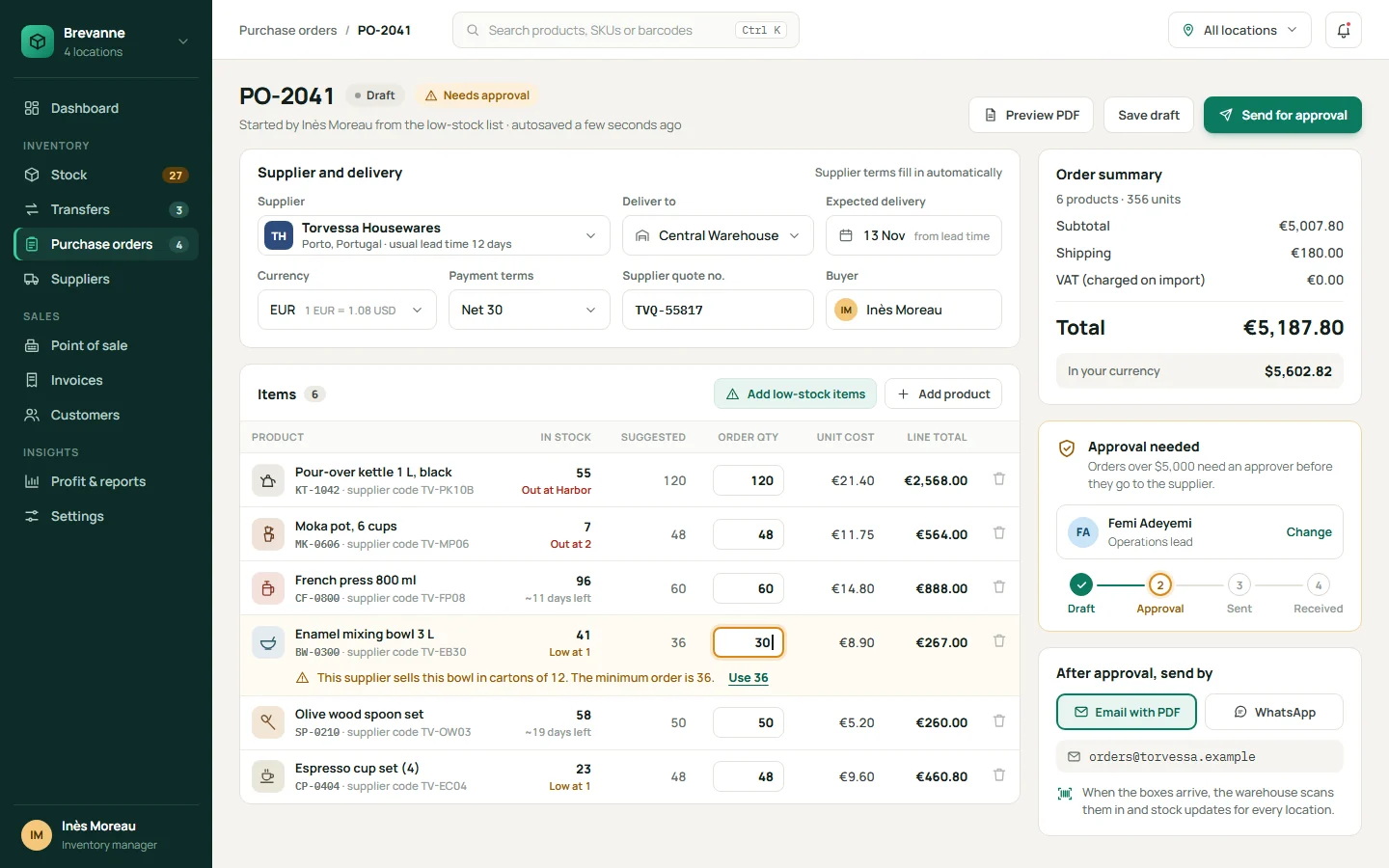
Buyers create orders from the low-stock list, with supplier codes, minimum quantities, lead times and supplier currencies. Orders above a set amount go to an approver before they are sent by email or WhatsApp.
Invoices and profit reports
Each sale creates an invoice. Reports show sales, cost and profit by product, category and branch, ready to export for accounting.
Mobile stock lookup
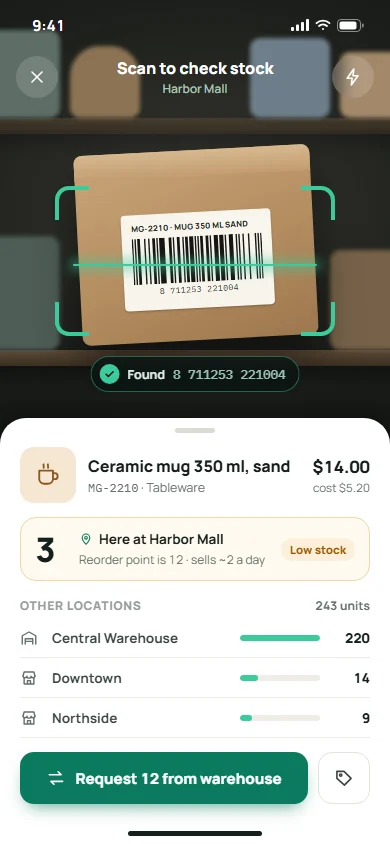
Staff scan a barcode with their phone to see stock in every location, then request a transfer from the same screen.
How it works
04 stepsFrom first click to daily use
- 01
Set up locations and products
We import your product list, barcodes, costs and current counts, and set up each store, warehouse and register.
- 02
Agree the rules
Reorder points, approval limits, user roles and tax settings are set per location, based on how your team already works.
- 03
Sell, move and reorder in one place
Cashiers, warehouse staff and buyers all work in the same system. Every sale, transfer and delivery updates stock for everyone at once.
- 04
Check the numbers
Managers see stock value, low-stock items and profit by branch on one dashboard, and send reports to accounting without copying data by hand.
Built with
The tools behind it
- Laravel (PHP)
- React
- Flutter
- PostgreSQL
- Redis
- WebSockets for live stock updates
- Camera and USB barcode scanning
- Stripe / Paymob
- WhatsApp Business API
- AWS / DigitalOcean
Next project
03 / 06Booking & scheduling system
Contact
Want something like this?
Tell us how your business works. We'll suggest what fits, even if that's a ready-made tool. No tech words needed.
What do you need?
Chat on WhatsApp+90 552 257 90 00 // Emailinfo@qcoders.com
Systems
Inventory and sales
Every branch's stock, sales and purchasing in one system.
A system for retail and wholesale businesses that sell from several stores and a warehouse. It brings stock, sales, transfers, purchase orders and profit reports into one place, on desktop and phone.
- Made for
- Shops and wholesalers that sell from several stores and a warehouse.
- Used by
- Cashiers, warehouse staff, buyers and managers, in one system.
- Runs on
- Desktop at the register and the office, phones on the shop floor.
The challenge
What needed solving
When a business sells from several stores and a warehouse, its stock lives in many places at once.
Counts sit in spreadsheets or separate tools, so nobody knows what is really on the shelf until someone calls the branch. A popular item runs out in one store while full boxes wait in the warehouse, and reorders are based on guesses. Sales, costs and profit are then put together by hand at the end of the month.

Features
What we built
Seven parts that keep stock right in every location, from the register to the purchase order.
-
Live stock per location
Every store and warehouse in one table, updated with each sale, transfer and delivery. Filter by location, category or status, and see stock value at cost.
-
Low-stock alerts with a next step
Each product has a reorder point per location. When stock drops below it, the system checks whether another location can cover it with a transfer, or whether it needs a new order.
-
Point of sale
A fast checkout for each register, with barcode scanning, member discounts, tax and card, cash or split payments. Every sale lowers the stock of that store right away.
-
Transfers between locations
Staff request stock from the warehouse or another store. The sender gets a pick list, and both locations update when the transfer is received.
-
Purchase orders with approval
Buyers create orders from the low-stock list, with supplier codes, minimum quantities, lead times and supplier currencies. Orders above a set amount go to an approver before they are sent by email or WhatsApp.
-
Invoices and profit reports
Each sale creates an invoice. Reports show sales, cost and profit by product, category and branch, ready to export for accounting.
-
Mobile stock lookup
Staff scan a barcode with their phone to see stock in every location, then request a transfer from the same screen.
-
Built with
- Laravel (PHP)
- React
- Flutter
- PostgreSQL
- Redis
- WebSockets for live stock updates
- Camera and USB barcode scanning
- Stripe / Paymob
- WhatsApp Business API
- AWS / DigitalOcean
How it works
From first click to daily use
-
Mobile lookup: scan a barcode to see stock at every location. Set up locations and products
We import your product list, barcodes, costs and current counts, and set up each store, warehouse and register.
Mobile lookup: scan a barcode to see stock at every location.
-
Purchase order: items added from the low-stock list, supplier minimums checked, and approval before sending. Agree the rules
Reorder points, approval limits, user roles and tax settings are set per location, based on how your team already works.
Purchase order: items added from the low-stock list, supplier minimums checked, and approval before sending.
-
Point of sale: barcode scanning, member discounts and live stock for this store. Sell, move and reorder in one place
Cashiers, warehouse staff and buyers all work in the same system. Every sale, transfer and delivery updates stock for everyone at once.
Point of sale: barcode scanning, member discounts and live stock for this store.
-
Stock overview: every store and the warehouse in one table, with low-stock alerts and bulk transfers. Check the numbers
Managers see stock value, low-stock items and profit by branch on one dashboard, and send reports to accounting without copying data by hand.
Stock overview: every store and the warehouse in one table, with low-stock alerts and bulk transfers.

Contact
Want something like this?
Pick what you need and we'll write the first message for you. No tech words needed.